Unit 1: COMPUTER FUNDAMENTALS
Key Unit Competency
By the end of the unit, you should be able to explain characteristics and evolution of
computers and appreciate impact of computers in the society.
Unit Outline
• Definition of computer science.
• Characteristics of computer.
• Classification of computer.
• Role of computers in society.
• History of computers.
Introduction
In the current generation, use of computers has become a common practice in
classrooms, business, offices, entertainment, health, broadcasting, and many
other areas. In this section, we discuss fundamental concepts, and characteristics,
applications and evolution of computers.
1.1 Definition of a computer and computer science
1.1 Definition of a computer and computer science
To adapt to the ever changing technologies, there is need to understand fundamental
concepts, and characteristics of computers.
1.1.1 Definitions
1.1.1 Definitions
Computer: A computer is an electronic device capable of receiving raw facts (data)
and performing a sequence of operations on the data based on special computer
instructions (processing) to produce desired output (information). Fig. 1.2 below
illustrates this process.
Computer Science: Computer science is a branch of science that deals with theory
of computation, or design and operation of computer hardware and software, and of
the application of computers in all sectors.
11.2 Characteristics of computers
Though humans are more intelligent than computers, much of the activities from
business to space exploration are now carried out with the support of computers.
Does this imply computers are better than human beings?
Upon completion of the essay, you should be able to appreciate that although
computers do not have feelings and intelligence like human beings, they are:
1. Fast: A computer can perform in a few seconds the amount of work a human
being can do in days, months or years
2. Accurate: A computer is far much more accurate than human beings during
data processing. The accuracy of the output obtained from a computer mainly
depends on input provided. If the input is wrong, the computer processes wrong
output hence the term Garbage In Garbage Out (GIGO). GIGO is a phrase used
in computer science that implies that if invalid or erroneous data is entered into a
computer (garbage in), the computer will process and output invalid or erroneous
results (garbage out).
3.Versatile: Computers are versatile i.e. flexible in that they can be used to carry out
different types of activities. For example, at one point using a word processor a
computer can be programmed to process words like a typewriter and while using
a spreadsheet to perform calculations like a calculator.
4. Reliable: Computers are more reliable because they do not not get tired or bored in
processing repeated work.
5. Power of remembering: Computers can store and recall high amount of information
depending with the size of secondary storage media.
6. Diligent: Computers do not suffer from human related traits such as tiredness,
and loss of concentration after working for long hours.
1.3 Classification of computers
Generally, computers can be classified using different criteria but the most common
classifications are based on size, processing power, function, and type data processing.1.3.1 Types of computers according to size and power
when classified by physical size and processing power, computers can either be
supercomputers, mainframe computers, minicomputers or microcomputers .1.3.1.1 Supercomputers
Supercomputers are the fastest, largest, most expensive and powerful computers
available. They are able to perform many complex operations in a fraction of a second .
supercomputers are mainly used for scientific research which requires
enormous calculations. Some of the applications that justify use of supercomputers
include aerodynamic design and simulation, petroleum research, defense and weapon
analysis and telecommunications. Because of its weight, a supercomputer is kept in
a special room as shown in Fig. 1.3.
1.3.1.2 Mainframe computers
Mainframe computers such as shown in Fig 1.4 are less powerful and cheaper
than supercomputers. While supercomputers may be described as giant computers,
mainframes are said to be big in size. They are used for processing data and performing
complex mathematical calculations. They have a large storage capacity and can
support a variety of peripherals. Mainframe computers are used as powerful data
processors in large research institutions and organizations such as banks, hospitalsand airports, which have large information processing needs.
1.3.1.3 Minicomputers
A microcomputer is the smallest , cheapest and relatively least powerful type of computer.
It is called a microcomputer because its CPU is called a microprocessor, which
is very small compared to that of minicomputers, mainframes and supercomputers.
Microcomputers are commonly used in schools, business enterprises, cybercafé,
homes and many other places. Today, the processing power of microcomputers has
increased tremendously close that of minicomputers and mainframes.Types of Microcomputers
Microcomputers my be classified into desktop and portable computers. A desktop
such as shown in Fig 1.6 are common types of microcomputer designed to fit
conveniency on top of typical official desk, hence the term desktop.
Portable computers are microcomputers small enough to be held by hand (handheld)
or placed on the laps while working (laptop). Examples of Portable computers
include laptops (notebook), tablets, and smartphones. Fig. 1.7 shows illustrations
of notebook PC and a tablet.
1.3.2 Types of computers according to functions
Regardless of the size and processing power , a computer can be classified according
to functions they perform. In this case, we have servers, workstations and embedded
computers. Servers and workstations are general purpose computers used to provide
access to resources on a network while special purpose computers are dedicated to
a single task.
1.3.2.1 Servers
A server is a dedicated computer that provides hardware or software resources to
other computers on a local area network (LAN) or a over the Internet. Unlike desktop
computers that have standard input and output devices attached, most servers such
as shown in Fig. 1.9 do not require such peripheral devices because they are accessed
remotely using remote access software. Because servers are expensive, a powerful
desktop computer may be converted into a server by adding the appropriate hardware
and software resources.
Generally, servers may be classified according to the task they perform. for example,a file server provides massive storages dedicated to storing files while a print
server is used to access to more printers, and network server is a computer thatmanages network traffic.
1.3.2.2 WorkstationA workstation is a name given to a computer connected to a server or network
intended to be used by one person at a time, they are commonly connected to a server.
This means that all users who utilize a computer at their job or school are using a
workstation. Commercially, workstations are used for business or professional usesuch as graphics design, desktop publishing and software development.
1.3.2.3 Embedded computers
Embedded computers are computing devices designed for a special purpose
Generally, an embedded computer has an operating system that only runs a single
application. Examples of embedded computing devices include dishwashers, ATM
machines, MP3 players, routers, and point of sale POS terminals.

1.3.3 Types of computers according to data typeComputer can be classified into digital computers , analog computers or hybridcomputers depending on the type of data they process .
1.3.3.1 Digital computers
Digital computers perform calculations and logical comparisons by representing data
and instructions as binary digits. This means that digital computers must convert
data such as text, numbers, images, video and sound into a series of zeros and ones
as represented by the signal waveform in Fig. 1.10. The data signal is either at 0V
or 5V. In this case +5 or -5V represent a 1. Most of the computers used today such
as desktop computers, laptops and tablets are digital computers.
1.3.3.2 Analog computer
These are computers that process data that is continuous (analog) in nature. An analog
signal is one which has a value that varies smoothly from peak to minimum and vice versa.
For example, the sound waves that your mouth produces when you speak are
analogue - the waves vary in a smooth way as shown in Fig 1.11. In the early days
of computer evolution, most of the computers were analog in nature. Today analog
computers are specialized devices used in engineering and scientific applications
unlike those used to measure speed, temperature and pressure data.
1.4 Role of computers in society
Computers play very important roles in various socio-economic sectors such as
economics, offices, financial institutions, industries, health, communication security
education, entertainment and libraries. In this section, we discuss common applicationareas of computers in our society.
1.4.1 Economics
Computers enables governments, businesses and individuals to plan, budget and tract
their revenues and expenditures. Increased computing power means that it has become
possible to perform economic analysis both at macro and micro-economic level.
1.4.2 Retail stores
Most retail stores use computers to help in the management of daily activities like
stock control. The stock control system keeps account of what is in stock, what is
sold and what is out of stock. The management is automatically alerted whenever aparticular item or items are running out of stock that need reordering.
1.4.3 offices
Computers has increased efficiency in offices by reducing the time and effort needed
to access and receive information . Most modern office functions have been automated
for efficiency service delivery .1.4.4 Financial institutions
In the banking sector, computers and mobile devices such as cellphones can be used
to withdraw or get services from different branches. special cash dispending,
machines called automated teller machines (ATM’s) have enabled automation of
cash deposits and withdrawal services. Efficiency has also been increased due to
better record keeping and document processing brought about by use of computers.
1.4.5 Industries
Computers are being used to monitor and control industrial processes.
The computer age has seen wide use of remote controlled devices called robots. A
robot is a machine that works like a human being but performs tasks that are too
unpleasant, dangerous, or complex and tedious to assign to human beings.1.4.6 Health
Computers are used to keep patients’ records in order to provide easy access to a
patient’s treatment and diagnosis history. Computerized medical devices are now being
used to get a cross sectional view of the patient’s body that enables physicians to get
proper diagnosis of affected body parts with high levels of accuracy. computers
also control life support machines in Intensive Care Units (ICU).1.4.7 Communication
Integration of computers and telecommunication facilities has made message
transmission and reception to be very fast and efficiency. Because of speed with
which information can be transmitted around the world using computers, the world
is said to have become a global village.
1.4.8 Security
Information stored in computers such as fingerprints , images and other identification
details help law enforcers carry out criminal investigations.
1.4.9 Education
Computers are used in teaching and learning in schools, colleges and universities.
Learning and teaching using computers is referred to as Computer Aided Learning
(CAL) and Computer Aided Instruction (CAI). For example, experiments in subjects
like Chemistry or Physics may be demonstrated using a special computer program
that can depict them on the screen through a process called simulation. To take care
of learners with special needs, computers with software and assistive technologies
Such as microphone , braille keyboards and text magnifiers have been developed
1.4.10 Entrainment
Computers can be used at home for recreational activities such as watching movies,
playing music and computer games. They can also be used in storing personal
information, calculating, keeping home budgets and research.
1.4.11 Library management
In a modern library, computers enable library personnel to easily access and keep
updated records of books and other library materials. Library users can also use
computers to search for titles instead of using the manual card catalogue.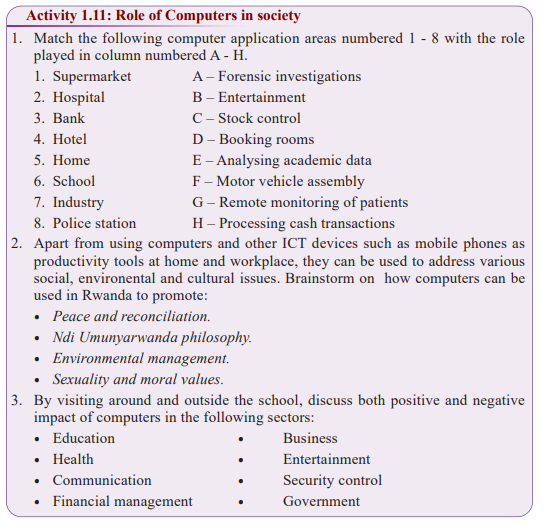 1.5 History of computersThe computer, as we know it today, had its beginning with a 19th century English
mathematics professor name Charles Babbage. Babbage designed the Analytical
Engine and that is considered as the basic architecture of modern electronic computers
are based on. it is not until 1993 when John Atanasoff and Clifford Berry
built the first electronic digital computer called Atanasoff -Berry Computer (ABC) .
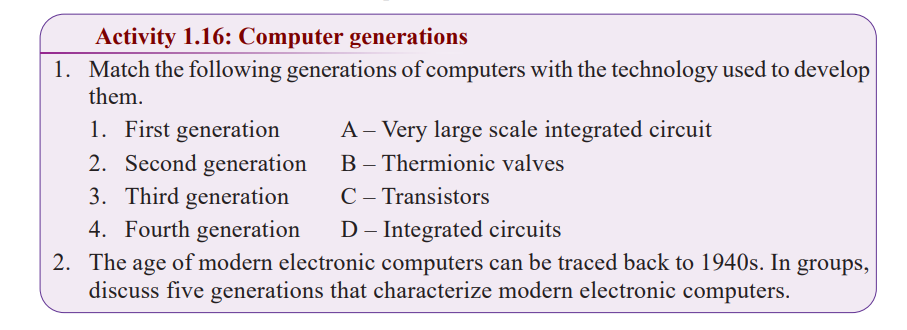
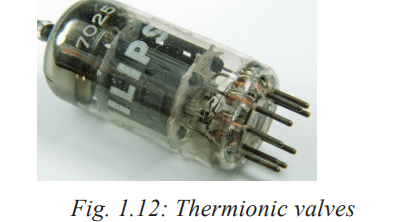
Since then, there are been major computer evaluations classified into five generations.1.5.1 First generation (1940-1956): Vacuum tubesThe first generations computers used electronic components known as vacuum tube
or thermionic values (Fig. 1.12) for circuitry and magnetic drums for memory.
These types of computers were enormous, expensive, consumed a lot of power,
and emitted a lot of heat which was often the cause of malfunctions. Input was based
on punched cards and paper tape, and output was displayed on printouts. The three
popular examples of first generation computers are Electronic numeric Integrator and
Calculator (ENIAC), Electronic Discrete Variable Automatic Computer (EDVAC)and Universal Automatic Computer (UNIVAC).

1.5.2 Second generation (1956-1964): Transistors
The invention of transistors shown in Fig. 1.13 ushered in the second generation
of computers that were made up of transistors that are superior vacuum tubes.
However, these computers but did not see widespread use in computers until
the late 1950s. Although transistors still generated a great deal of heat,
they were faster and more reliable than those made of vacuum tubes.
In terms of input, computers in second generation relied on punched
cards while storage was on magnetic cores. Examples of second generation
computers include IBM’s 1401 and 7070, UNIVAC 1107, ATLAS LEO Mark III
and Honeywell H200.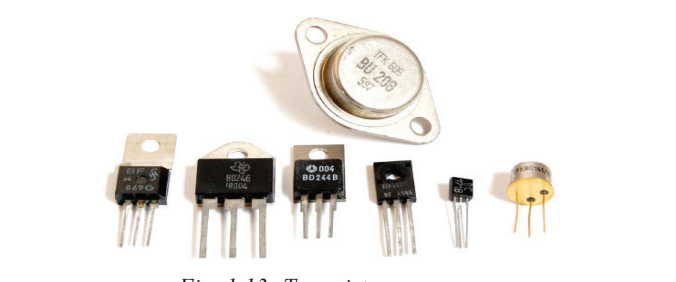

1.5.3 Third generation (1964-1970): Integrated circuits
Development of electrical components known as integrated circuit (IC)
was the hallmark of the third generation of computers. Fig. 1.14 shows
illustration of ICs that are made up of transistors embedded on silicon
chips called semiconductors. Most third generation computers allowed
users to interact a computer through keyboards
and monitors. For the first time , computers became accessible to a mass
audience
because they were smaller and cheaper than their predecessors.
Examples of third generation computers include smaller and less
expensive minicomputers such as IBM 360 and ICL 19000 series.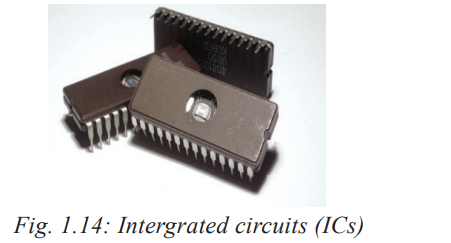

1.5.4 Fourth generation (1970-Present): Microprocessors
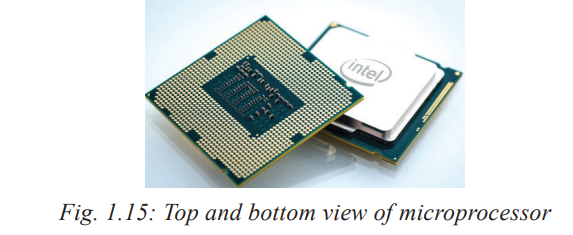
Further technological improvements on ICs saw very large integrated (VLI) circuits
which have thousands of integrated circuits built onto a silicon chip as microprocessor
shown in Fig. 1.15. It is in the fourth generation computers that programs with
graphical user interface (GUIs), mouse, and hand-held devices were introduced.
Some the early examples of fourth generation computers include IBM 370 and 4300,Honeywell DPS-88 and Burroughs 7700.
1.5.5 Fifth generation (Present and beyond): Artificial intelligence
Tremendous improvement on hardware and software has given rise to what is loosely
Considered as the fifth generation computers that are based on artificial intelligence.
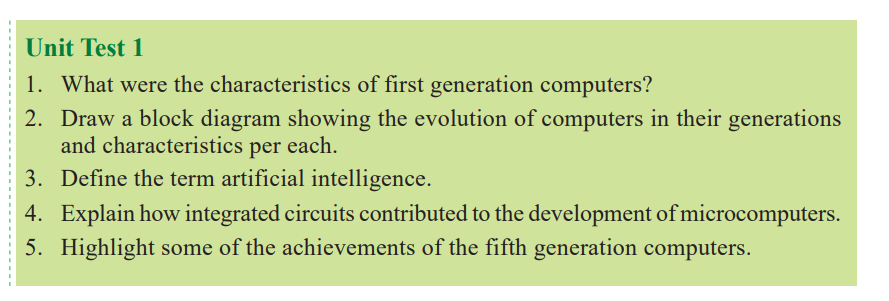
The term artificial intelligence refers for capability of a computer to mimic human
behaviour. the goal of fifth generation computing is develop devices that are capable
of learning, and respond to natural language input (voice recognition. In
future research outcomes in the fields of artificial intelligence and nanotechnology
are expected to radically change the face of modern computers.
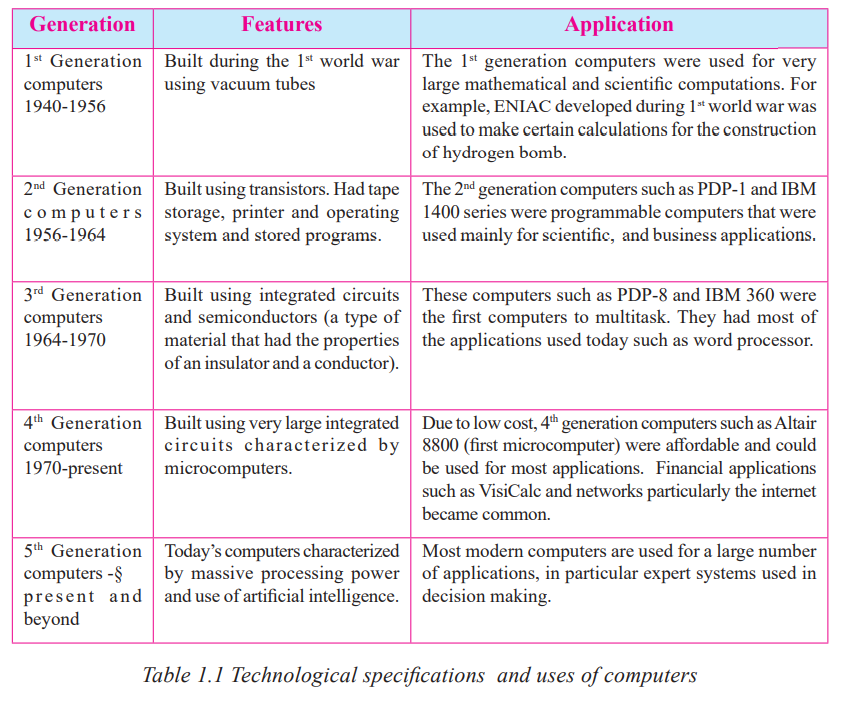
Table 1.1 give the a summary of the main technological specifications and use of computers
from the first to fifth generation.